

Don’t trip at the finish line! – Follow through all the steps involved in an eCommerce sale.
When you’re doing something right, your customers should find themselves at the checkout of your eCommerce store with shopping carts full and their credit cards at the ready in their hands. You’re almost at the finish line; don’t trip!
Here are some ways we can accommodate our shoppers to ensure the sale is completed and the experience is pleasant. We will address more checkout-related issues in future blog posts so look out for those!
Checkout Usability
Here’s an interesting list of the Top 100 E-Commerce Checkouts from Baymard Institute. You can check out (Ha! See what we did there?) different types of checkout and its effectiveness in performance.
One of the questions that haunts many a eCommerce retailer is: How do we avoid the dreaded abandoned cart? In eCommerce, this is a particularly frustrating issue as there could be many reasons why customers leave, taking their money with them. It’s not enough that you attract customers to your site and get them to like your stuff and want it – it has to be reflected in an action. In order to get the action we want, we have to make it easy for them and eliminate all possible distractions and roadblocks.
The All-Important Shopping Cart
The shopping cart is the feature that we all take for granted. It’s a standard feature and we generally don’t give it much thought; after all, it just holds items. Optimizing this feature, while subtle, can provide further value for customers.
While the shopping process actually begins the moment they arrive at our website, let’s assume we’ve done everything right in providing a great experience and we’ve got what they’re looking for. Our customers are now adding items to their shopping cart. There is the standard cart or we can optimize this feature further for potentially greater sales. A high-performing cart could make the difference, providing more options. It conveys feelings of high quality and attention to detail and caring about customers. Adding value to standard features can make a customer feel valued.
A feature-rich solution, Nav-to-Net™ has a shopping cart with a Quick Cart option. With the Quick Cart option, you are able to add items and their variant (colour, size) and quantity straight into your cart. This method works for the familiar shopper who just wants to be in and out of your webshop. They already know what it is they want. Not every shopper who comes across your webshop is new and will want to browse. This helps you to accommodate different kinds of shoppers.
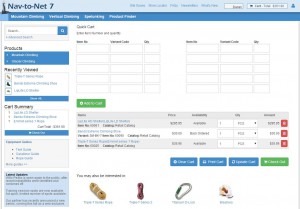
Nav-to-Net™ Quick Cart Option
Digital Vantage Point provides a seamlessly integrated solution from start to finish with our expertise and deep understanding of Microsoft Dynamics™ NAV. For more information, feel free to check out our brochures: Product Brochure | Feature Guide
Request a Demo to see Nav-to-Net™ in action.
Any questions? We’d love to hear from you. | [email protected]